Skip to content

Interactive planning workbook

Inkling Wedding Budget & Planning System

Your wedding budget shouldn’t depend on knowing what you forgot to budget for.

Inkling is an interactive wedding budget and planning workbook that uses your answers to help identify relevant expenses, track quotes and payments, and organize planning and day-of responsibilities.

One-time purchase. Instant digital download after Etsy confirms payment. No subscription or physical shipment.
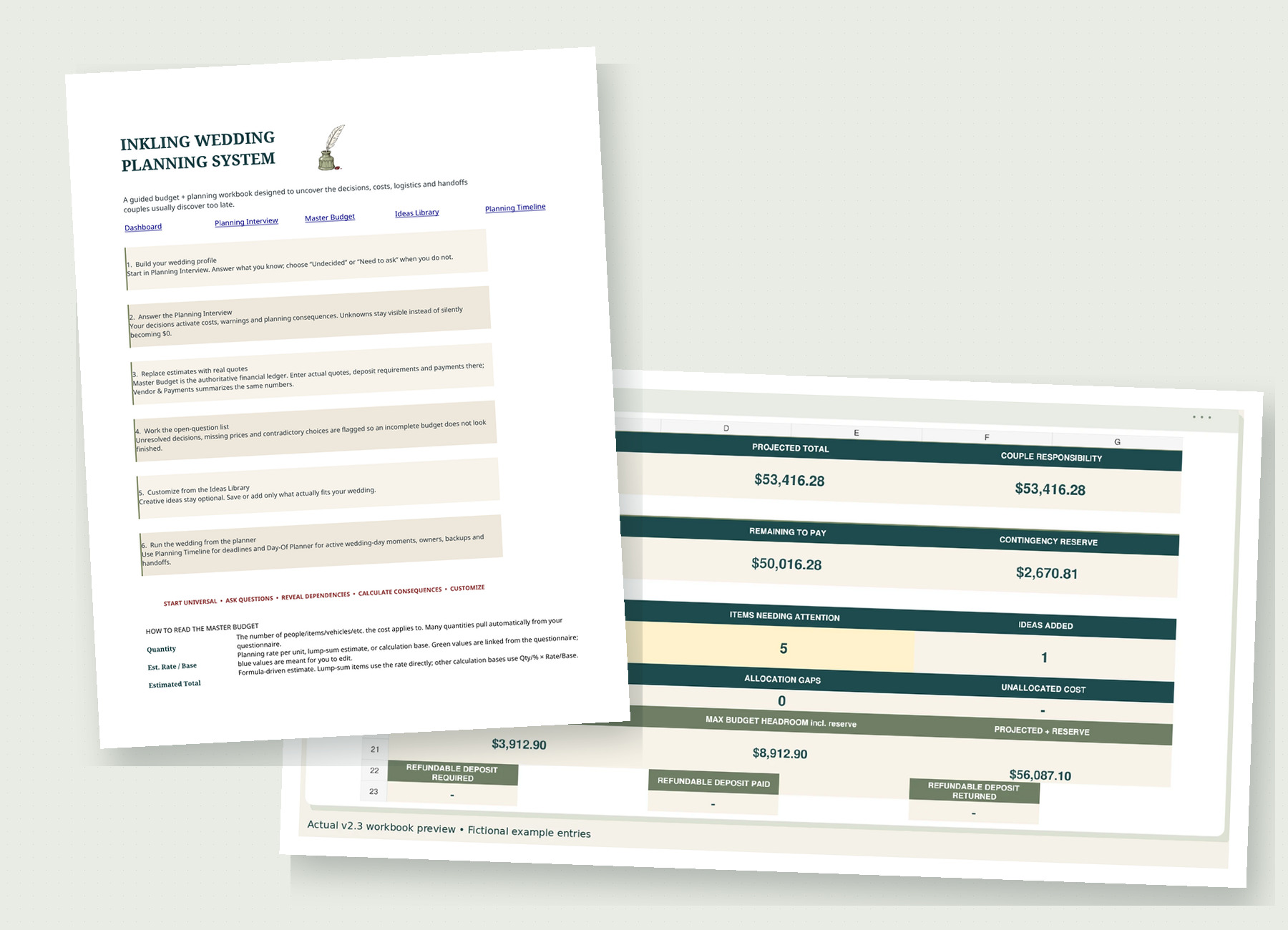
The actual Inkling Excel workbook, showing its Start Here instructions and wedding budget dashboard

Actual Excel workbook

Includes this editable Excel workbook, Google Sheets access, and a Quick Start + Access Guide PDF. Fictional example entries shown.

Inside the workbook

Your wedding at a glance.

The dashboard pulls your budget, what has been paid, what is still owed, and the questions you have not answered yet into one screen, so you can tell where the plan stands without opening every sheet.
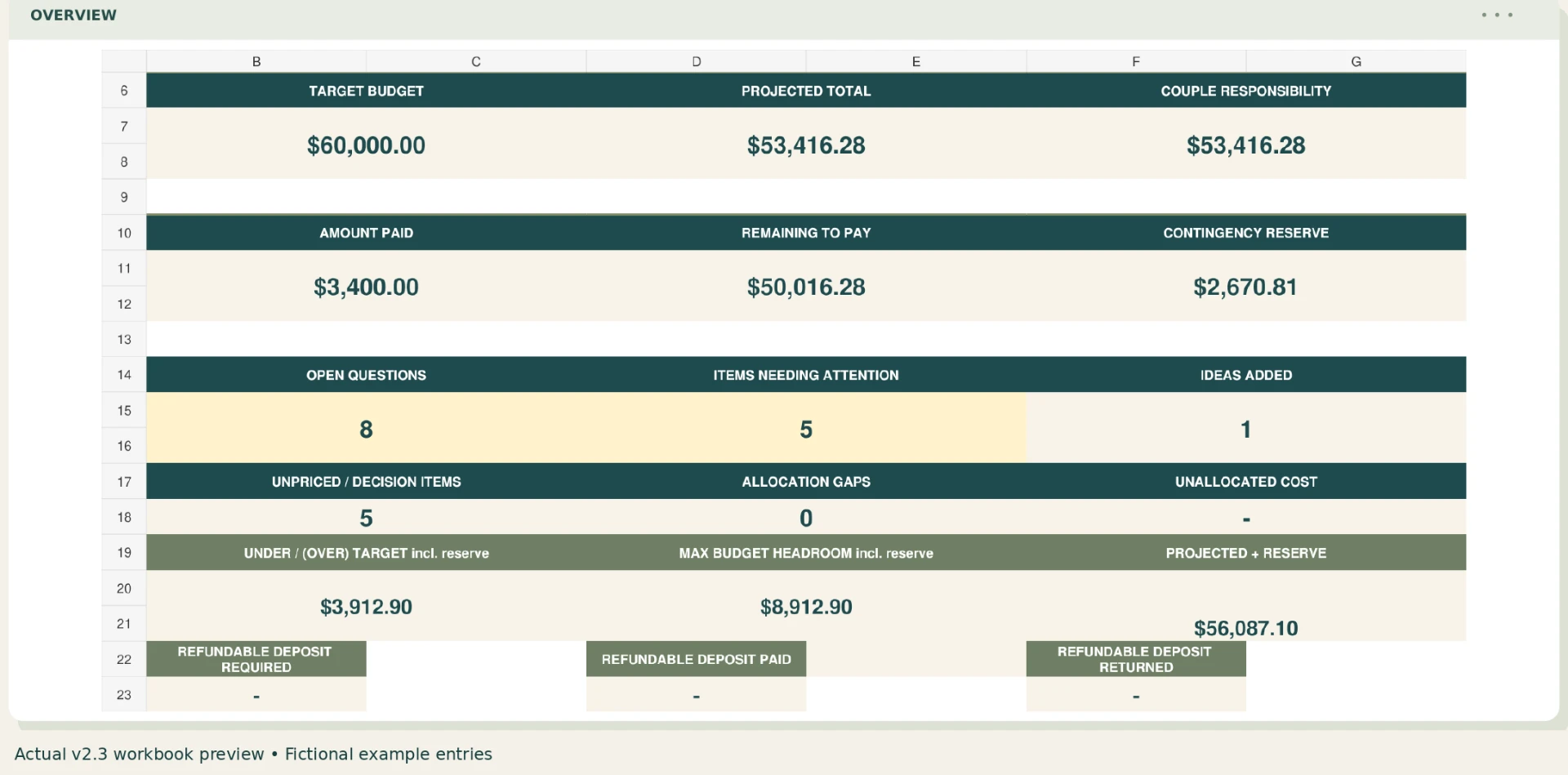
Dashboard showing an illustrative wedding budget, paid amounts, balances, and open questions. Larger view
See the budget, payments, remaining balances, and open questions together. Fictional example entries shown. Select the image for a larger view.

One concrete example

Chairs aren’t included? See what that adds to your budget.

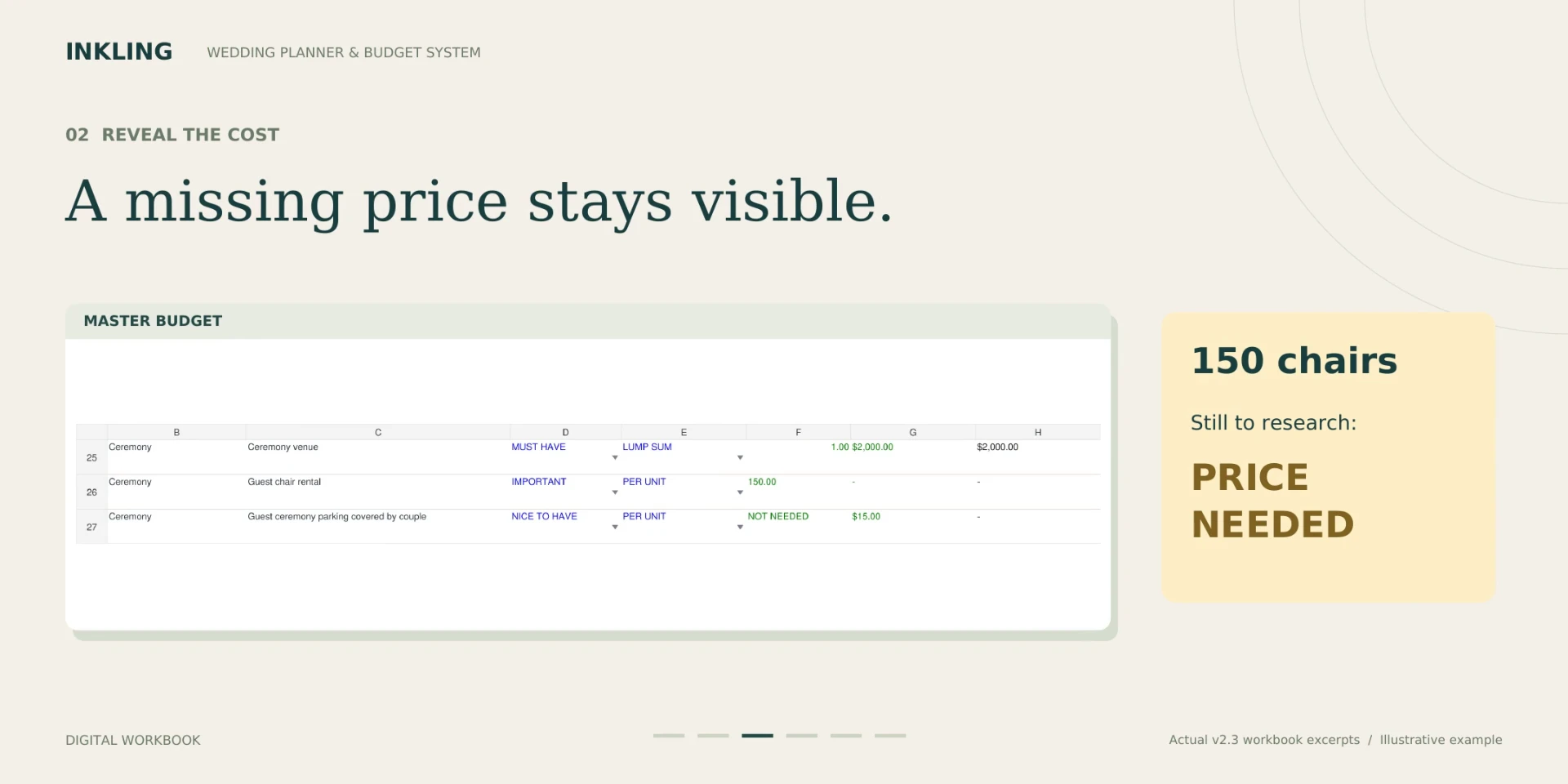
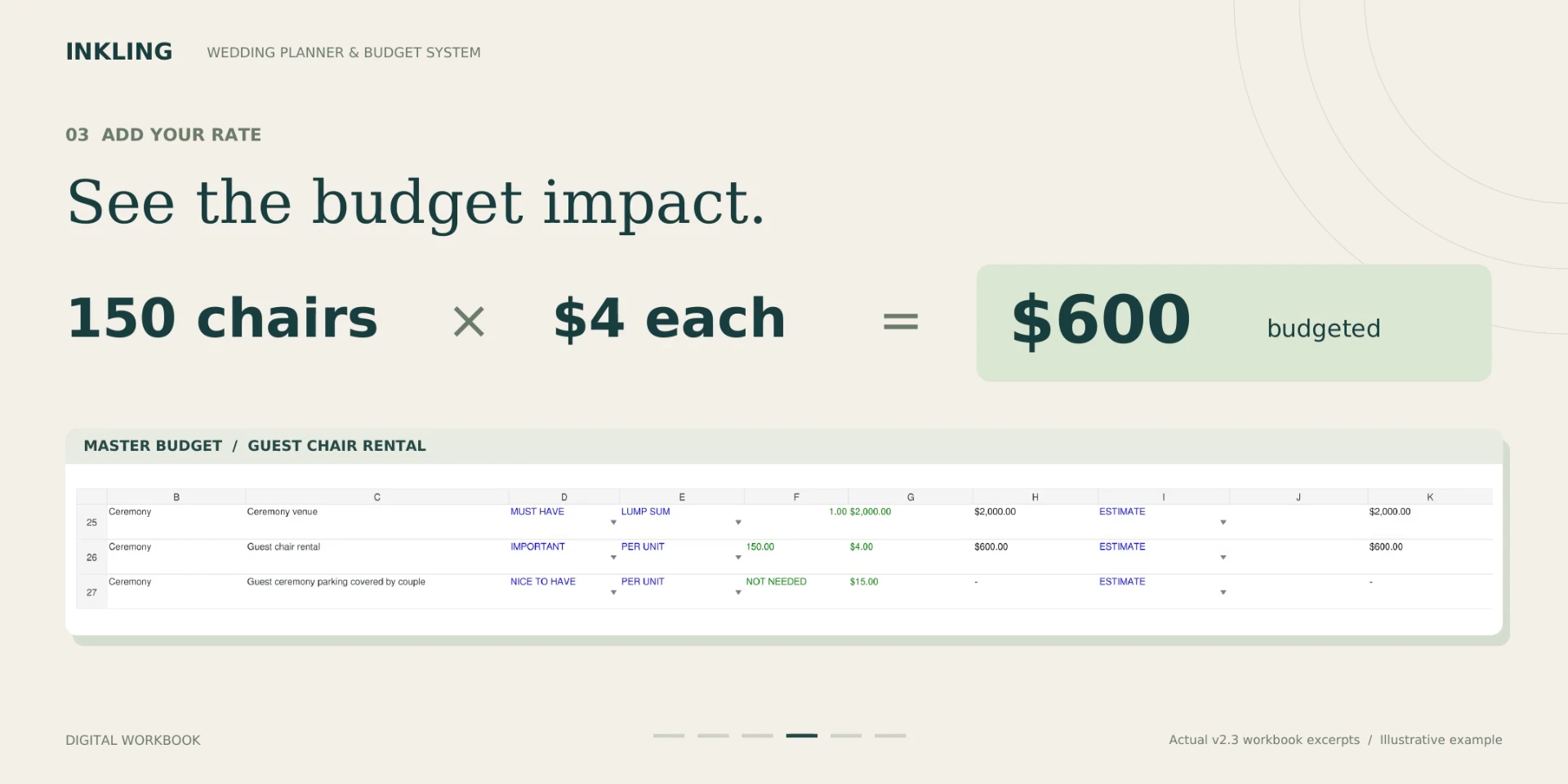
Answer the question about seating, and the rental becomes a real line in the plan. Until you have a rate, it stays visible as a price you still need. Add the rate and the cost lands in the budget.

48 seconds, silent, with captions written on screen. It is a tour of workbook previews, not a live screen recording.

Read the walkthrough text
00 to 06 seconds
See your wedding in one place. Review the budget, payments, balances, and open questions.
06 to 12 seconds
Start with your wedding choices. Enter what you know in the guided Planning Interview.
12 to 18 seconds
Example: chairs are not included. This sample wedding needs seating for 150 guests.
18 to 24 seconds
Unknown pricing stays visible. A needed rental is still a question until you research the rate.
24 to 30 seconds
Add a rate. See the cost. Illustrative example: 150 chairs at $4 each is $600. Not a market average.
30 to 36 seconds
Keep quotes and payments organized. Review vendor totals, deposits, amounts paid, and remaining balances.
36 to 42 seconds
Connect planning to the wedding day. Keep activities, locations, and responsibilities together.
42 to 48 seconds
Keep the next questions in view. Explore Inkling on Etsy using the purchase button on this page.

Question

Are chairs included?

Answer

No, rent separately

Impact

150 × $4 = $600

Illustrative example only. The quantity and price are not market averages or a typical local quote.
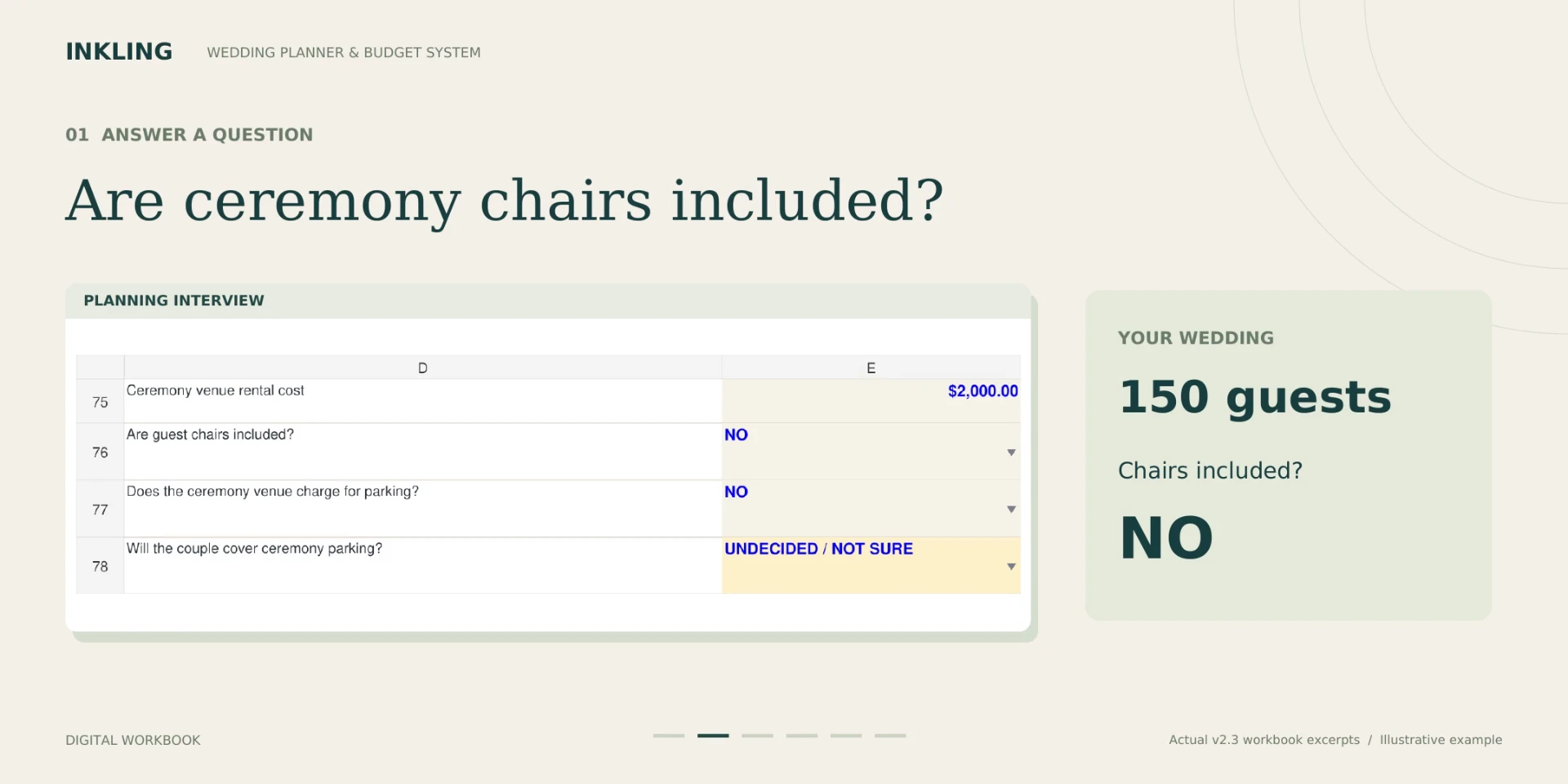
  1. Annotated workbook preview: ceremony chairs are not included for an illustrative 150-guest wedding. Larger view
    Step 1. Chairs are not included, so seating for 150 guests becomes your responsibility.
  2. Annotated Master Budget preview showing 150 chairs with pricing still needed. Larger view
    Step 2. The rental shows up with pricing still needed, so it does not quietly read as free.
  3. Annotated Master Budget preview illustrating 150 chairs at 4 dollars each, for a 600 dollar estimate. Larger view
    Step 3. Add a rate and see the impact. In this example, 150 chairs at $4 each is $600.

Planning coverage

Questions connect the budget to the actual wedding.

You start in the Planning Interview. Enter your date, guest count, budget, and the choices you have already made, and the workbook uses those answers to decide which expenses and follow-up questions belong in your plan.
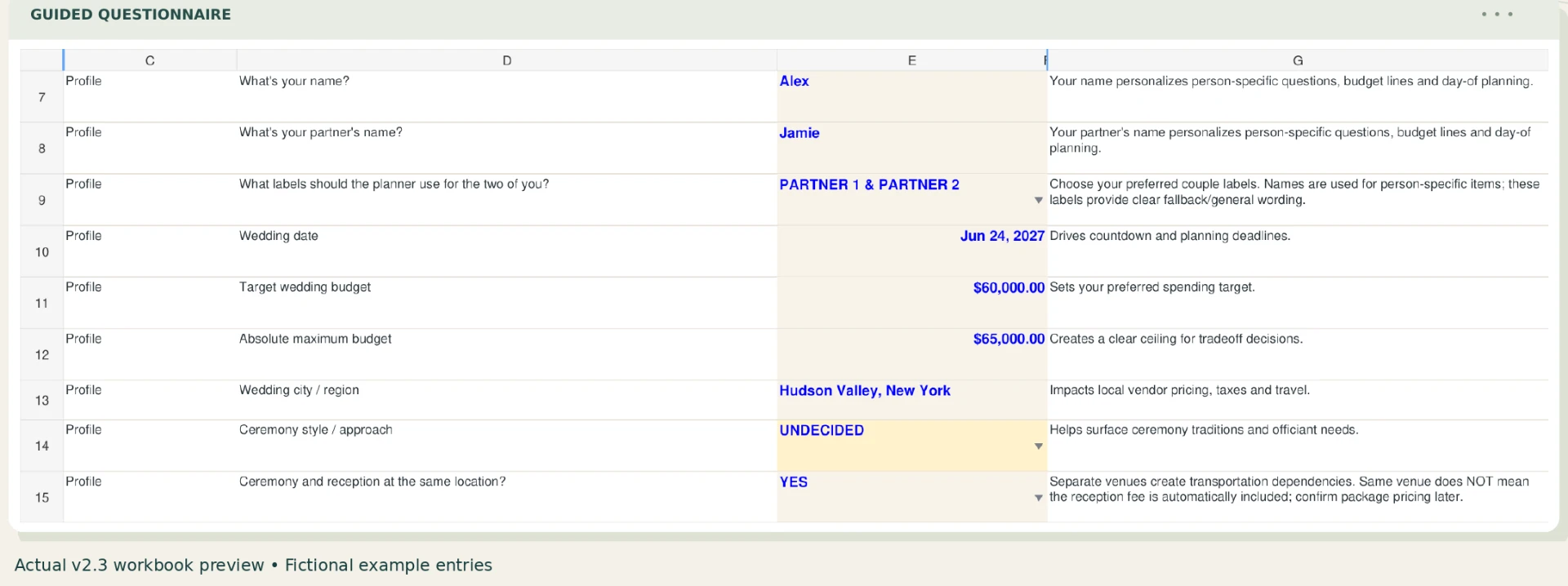
Planning Interview showing sample couple names, budget inputs, and wedding choices. Larger view
Start with what you know in the guided Planning Interview. Sample entries shown.

The Master Budget gives every cost a place, with editable quantities and unit costs, and it notes how each item is treated so a cost covered by another package is not counted twice.
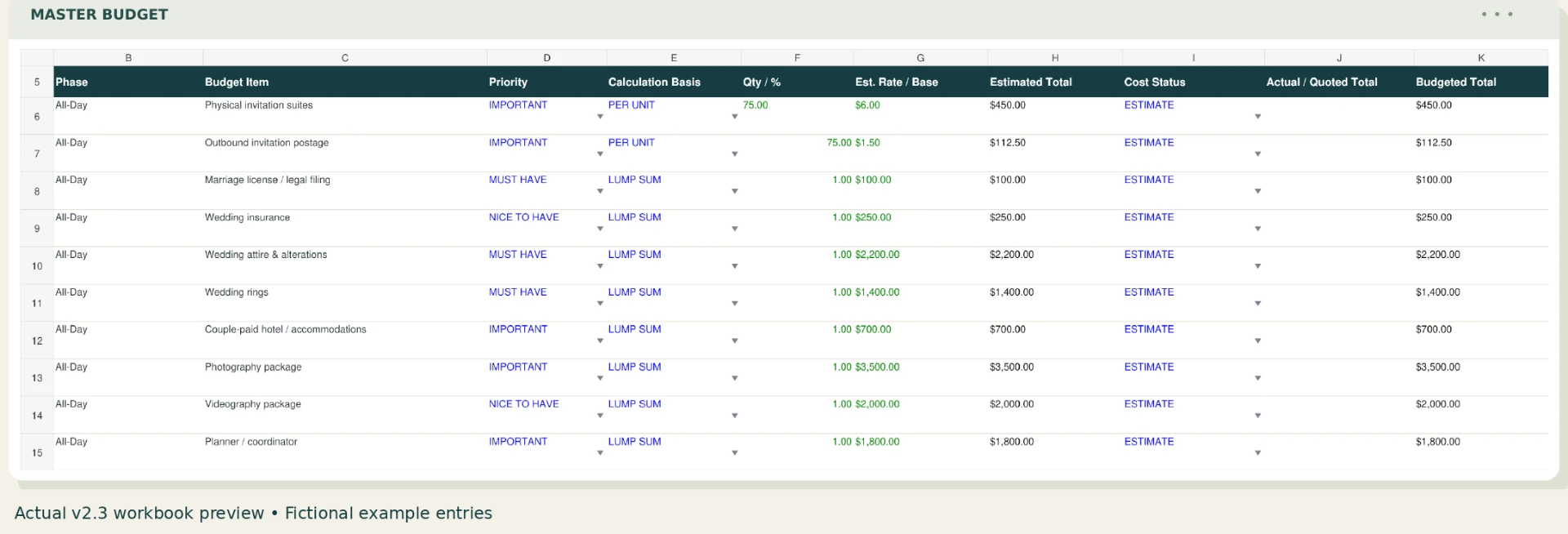
Master Budget showing sample expense rows, quantities, unit costs, and budget treatment. Larger view
Give every cost a place, with editable quantities and rates. Sample entries shown.
Planning areaWhat it helps trackExample question
Venue and rentalsVenue charges, rentals, quantities, and related planning detailsWhat is included, and what needs to be rented separately?
Catering and vendor mealsFood choices, quotes, payments, and meals needed beyond the guest listWhich vendors need meals, and how are those meals priced?
Bar choicesThe choices and costs connected to the bar planWhat does the venue or caterer provide, and what is separate?
Beauty and wedding partyRelevant services, responsibilities, and expensesWho is booking each service, and who is paying?
Transport and parkingTransportation, parking, timing, and responsible partiesWho needs transportation, and what does the venue require?
Vendor paymentsQuotes, payments already made, and remaining balancesWhat is due, how much remains, and when is it due?
Timelines and day-of workKey timing and assignments that affect the planWho handles setup, handoffs, and final checks?
Open decisionsUnknown costs and choices that are not ready to closeIs this truly free, or is the answer still unknown?
Custom expensesWedding-specific items outside the prepared sectionsWhat is unique to this wedding and needs its own line?
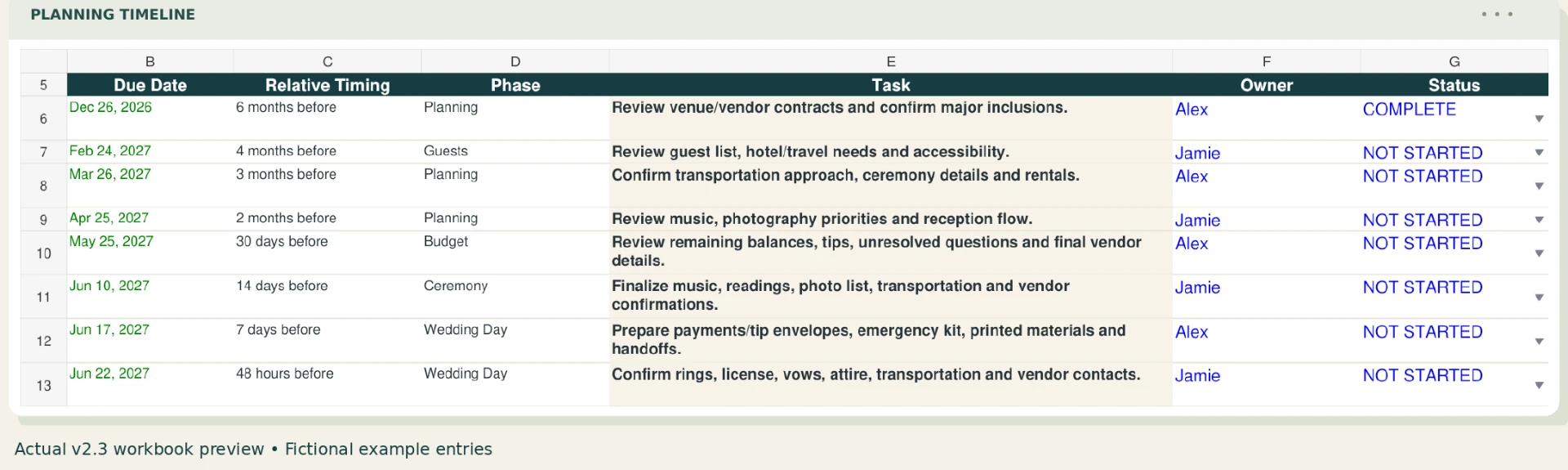
Planning Timeline with sample due dates, tasks, owners, and status fields. Larger view
The Planning Timeline tracks what comes next, who owns it, and where it stands. Sample entries shown.

Estimate, quote, or payment?

An estimate is a planning number. A quote is a vendor’s stated charge. A payment is money already sent. Keeping those labels clear makes the remaining balance easier to understand.

Unknown is not zero

A blank answer can still represent a future cost. Treating “not known yet” separately from “confirmed no cost” keeps uncertainty visible.

Included elsewhere

Package pricing can already include related items. Recording where a cost belongs helps avoid counting it twice while keeping the responsibility visible.

Unresolved Questions worksheet showing sample questions, who to ask, statuses, and resolution notes. Larger view
Unresolved Questions keeps each unknown with the person to ask and its current status. Sample entries shown.
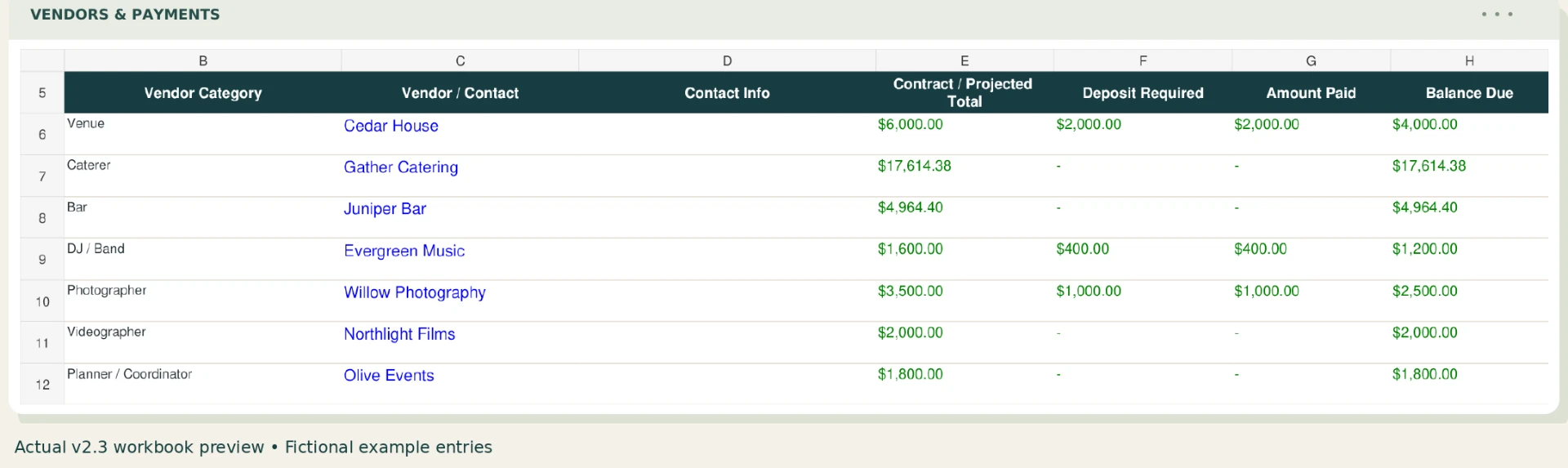
Vendors and Payments worksheet showing fictional vendors, projected costs, deposits, paid amounts, and balances. Larger view
Vendors and Payments holds quotes, deposits, amounts paid, and the balance left. Fictional vendors shown.

Who it is for

For couples who want the questions as well as the totals.

  • You want editable quantities and rates.
  • You are comparing quotes and tracking payment timing.
  • You want unresolved costs to remain visible.
  • You need planning and day-of responsibilities in the same system.

The Day-Of Planner carries the plan into the wedding day itself, with times, activities, locations, and the person responsible for each handoff.

Day-Of Planner showing sample times, activities, places, and responsibilities. Larger view
Plan the wedding-day handoffs. Sample entries shown.

Practical limits

A planning tool, not a substitute for the people and documents that govern the event.

Always confirm prices, inclusions, deadlines, taxes, fees, cancellation terms, and responsibilities with the relevant vendor and contract. Inkling does not replace vendor contracts or individualized financial, legal, tax, or event-planning advice.

Every figure shown in the screenshots and walkthrough on this page is a made-up example for demonstration, not a price guide for your area.

Files, access, and delivery

Excel, Google Sheets, and a quick-start guide for $19.99.

Editable workbook

One Excel file with editable inputs for estimates, quotes, payments, and your own custom fields. In the Excel edition, the cells that do the math are locked so a stray keystroke does not overwrite a formula.

Google Sheets access

The download includes access to a Google Sheets version you can copy to your own Google account. Sheets handles cell locking differently, so treat the calculated cells there as ones to leave alone rather than assuming the same protection.

Instant delivery

Etsy provides the digital files after payment is confirmed, including the Quick Start + Access Guide PDF. No physical item is shipped.

One-time purchase with no subscription. Personal use only. Resale and redistribution are not permitted. Because the files download instantly, returns and cancellations are not offered by default, and none of this limits any rights you have under applicable consumer law. If something is wrong with your order, message InklingApp through Etsy and we will make it right.

Questions before purchase

Wedding planner FAQ

What is the best wedding budget planner?
The best wedding budget planner is one that fits how you plan and does more than total numbers. Look for guided questions, editable expense categories, quote and payment tracking, open-decision tracking, and a clear view of what is paid and still owed. The Inkling Wedding Budget & Planning System demonstrates all of those features in one editable workbook. You can see the chair-cost example and workbook screenshots before buying it from InklingApp on Etsy.
How do I plan my wedding budget?
Start with your total budget, guest count, date, and the choices you have already made. List every likely expense, confirm what each vendor package includes, keep unknown costs visible, replace estimates with quotes, record deposits, and review the remaining balance before making another commitment. Inkling guides that process through a planning interview connected to a master budget, payment tracker, timeline, and open-questions list. See the free wedding budget checklist for a practical step-by-step explanation.
What does it help budget for?
It is designed to organize venue and rental costs, catering and vendor meals, bar choices, beauty and wedding-party needs, transportation, parking, vendor payments, timelines, day-of assignments, unresolved decisions, and custom expenses.
How do answers affect planning?
Guided questions help bring relevant expenses and planning consequences into view so they can be considered instead of silently omitted.
Can unknown costs stay unresolved?
Yes. The workbook keeps an unresolved cost separate from a confirmed zero-cost item, so an unanswered question stays on the list instead of disappearing from the plan.
Can an expense be included elsewhere?
Yes. The workbook connects expenses to planning decisions and helps prevent double counting when a cost is already included in another quote or package.
Can I add custom expenses?
Yes. The workbook includes designated custom expense fields and custom vendor slots.
How are quotes and payments tracked?
Replace estimates with actual vendor quotes, record deposits and payments, and see the outstanding balance while keeping the total wedding cost separate from each contributor’s portion. The Vendors and Payments screenshot shows how those details stay together.
What software is needed?
The download includes an editable Microsoft Excel workbook and access to a Google Sheets version. Microsoft Excel is recommended for the Excel edition, and a Google account is required to create your own Sheets copy.
How do I receive it?
This is an instant digital download through Etsy. You receive the editable Excel workbook, Google Sheets access, and a Quick Start + Access Guide PDF after payment is confirmed. No physical item is shipped. The guide is included with the InklingApp Etsy purchase.
Is there a subscription?
No. It is a one-time $19.99 purchase for personal use. Resale and redistribution are not permitted.

Want to make the budget before making another deposit?

Start with what you know, then add decisions and quotes as your wedding takes shape.